


 32
32A milestone in digital microscopy and microphotography – the Nikon D300 and D3
The Nikon D3 is the first digital SLR camera with Live View, HDMI video output and a full format sensor
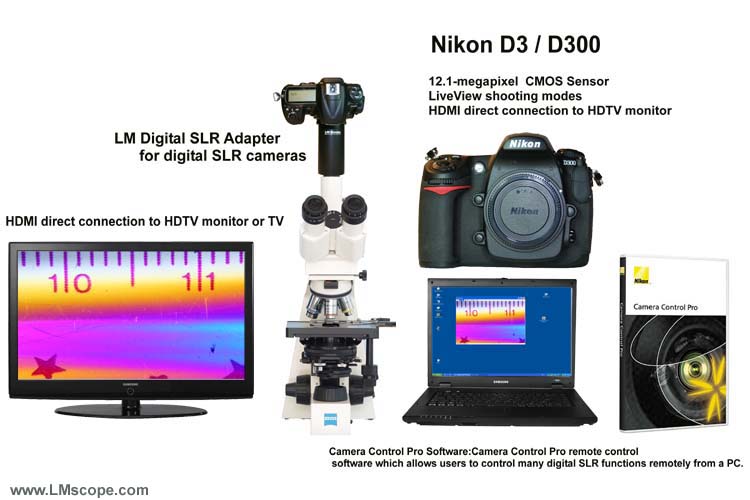
When used in conjunction with the high resolution LM DSLR adapter, both the Nikon D300 and the Nikon D3 are ideally suited to microscopy.
Excellent microscope images can be achieved with the integrated hard-coated precision optics of the LM DSLR adapter in conjunction with high quality plan fluoride or plan apochromatic microscope lenses.
The two cameras score, on the one hand, through their Live View function, which makes setting the camera to the optimum focus plane considerably easier, and on the other hand through their digital video output (HDMI). This function has been integrated into both Nikon DSLR cameras, making it possible to view a high resolution preview on an HDTV monitor.
Using HDMI (High Definition Multimedia Interface) in digital cameras means that it has become possible for the first time to take full advantage of modern monitors.
The digital HDMI connection that has been standard for a number of years on every modern plasma or LCD TFT HDTV monitor (television) has now replaced the outmoded analogue PAL video port.
The PAL standard only enables the user to transmit videos at a resolution of 768 x 576 pixels. HDTV monitors, by contrast, have a maximum resolution of 1920 x 1080 pixels.
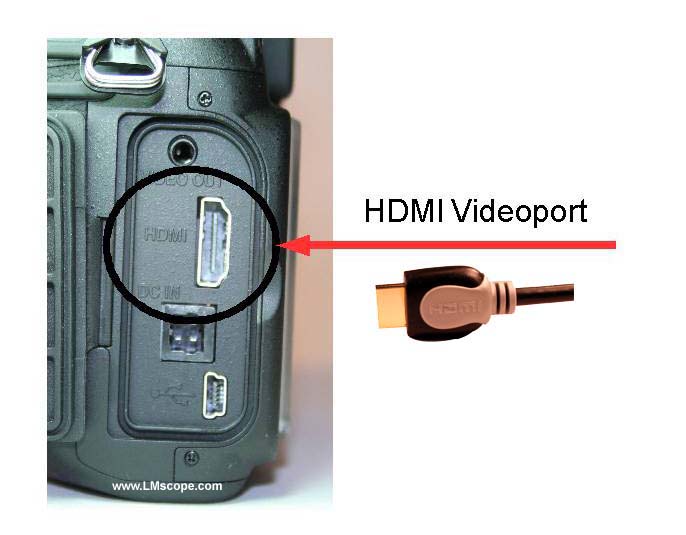
The HDMI port of the Nikon D300 or the Nikon D3 is considerably larger than the conventional analogue port and, in addition, has more electrical contacts. The old analogue video port is located above the HDMI port.
First, connect the camera to the monitor using a special HDMI cable.
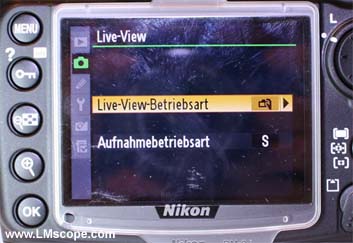
Then, activate the Live View mode in the camera’s menu.
We recommend the Nikon Camera Control Pro 2 software, which allows the user to control the camera functions directly from the PC, using either a cable connection (USB or LAN) or a wireless LAN interface. This makes it possible to work quickly and professionally.
Unfortunately, the Nikon Camera Control Pro2 software is not included in the price of the camera but must be ordered separately.
Further information is available at the following links:
PAL http://en.wikipedia.org/wiki/PAL
HDMI http://en.wikipedia.org/wiki/High-Definition_Multimedia_Interface
Watch also testing report: Nikon D7000
New LM Digital Adapter for: Nikon Z9 / Nikon Z8 / Nikon D6 / Nikon Z6III / Nikon Z6 / Nikon Z6II / Nikon Z7 / Nikon Z7II / Nikon Z5 / Nikon Z50 II / Nikon Z50 / Nikon Z30 / Nikon Z fc / Nikon D850 / Nikon D780 / Nikon D5 / Nikon D4s / Nikon D4 / Nikon D750 / Nikon D500 / Nikon D810 / Nikon D800 / Nikon D800E / Nikon Df / Nikon D610 / Nikon D600 / Nikon D7200 / Nikon DS-Qi2 (Microscope Camera) / Nikon D3x / Nikon D3S / Nikon D7100 / Nikon D7000 / Nikon DS-Ri2 (Microscope Camera) / Nikon D7500 / Nikon D700 / Nikon D3 / Nikon D5500 / Nikon D5200 / Nikon D5300 / Nikon D300 / Nikon D3500 /