Top Microscopy articles 
HD Camcorder for use with a microscope for the bargain price of EUR 79.00
AIPTEK HD camcorder beats many professional video cameras
Nikon economises with the automatic exposure control! With the lower-priced Nikon D40/D40x /D50/D60/D90/D100 / D5000 
LM digital adapter connection now also available for compact cameras!
Which digital camera functions best on a microscope?
Compact cameras and camcorders on the microscope
DSLR cameras are simply better!
USB (universal serial bus) video cameras in microscopy – quite simply far too slow!
Setting the parfocality
Improved picture quality through mirror lock-up in SLR cameras
Using full-frame digital SLR cameras in microscopy
more articles
Top Macro photography articles 
HD video macroscope with digital HD camcorder for a bargain price of EUR 79.00! 
Full HD video macroscope for a bargain price with Aiptek AHD H5 Extreme digital full HD camcorder
Macro photography with the Olympus pancake 17 mm lens and the 80 mm LM DSLR macro lens
Digital macro photography with “classic analogue lenses” at bargain prices
Are normal stereo microscopes suitable for high-quality photographic documentation?
Turn your digital reflex camera into a microscope
LM DSLR Macro Lens Workshop
Compatibility list for LM DSLR macro lenses
more articles
Newsletter
Demo Pictures
Tips and tricks
Press Center
Reference Clients
Contact 


Setting up and editing a database of video sequences by using the video compression system DivX®5
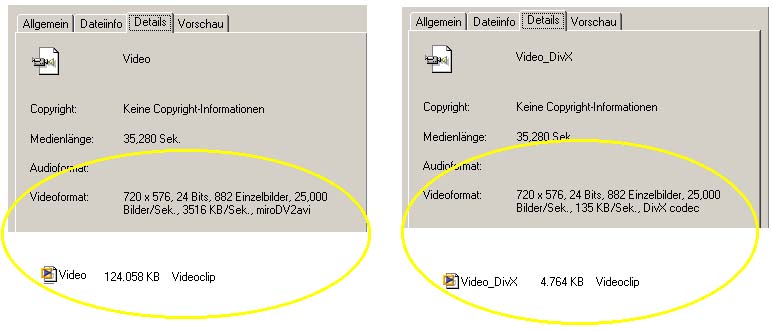
Video sequences need a lot of disc space if they are not compressed: for one hour in full DV quality you need approx. 13 GB. Depending on the range of application and the desired compatibliliy several different compression modes are available. The most common video compression modes are: MPEG1, MPEG2, MPEG4, mov (QUICKTIME®:) and VHS VideoCD. However, the compression system that offers the best proportion between the required disc space and image quality is momentarily the DivX® Networks Codec with free download in the internet.

This DivX®-Codec enables recording a 90 min video on a normal recordable CD (700 MB) and therefore is the best suited system for setting up a database for long camcorder videos. So a 16 min video sequence in full DV quality (resolution of 720x574) needs approx. 3 GB without compression, whereas after compression it occupies just 200 MB disc space. The compressed video is 20 times smaller than the original file. 

To be able to play the compressed video sequences (and generally for all actions in digital video editing) it is recommendable to use a fast CPU.
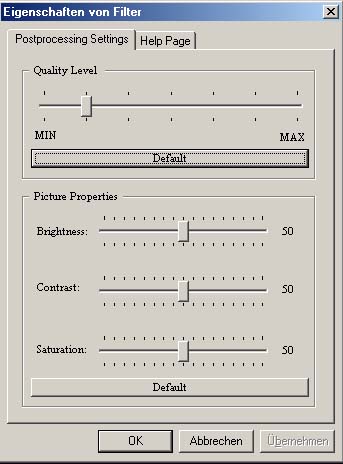
In the playback mode, the
DivX® Codec offers the so-called Postprocessing Setting option which can be adjusted in the player (Media Player® etc.). This function enables the rendering of each single picture while playing the video and so improves the image quality. A wrong (too high) postprocessing level causes a discontinuous image sequence.
To be able to play back the video sequences, the DIVX® Codec has to be installed on the computer.


What do you need for video compression in DivX®?
 
 
1. DivX® Codec,  at present: Divx® Codec 5
2. Video cutting software, like: Pinnacle Studio 7 ®:

 or Virtual Dub (Freeware)
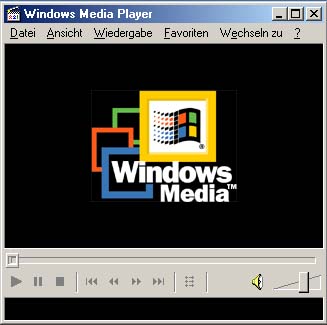
3. Player to play the videos:  e.g. Windows Media Player ®

First steps for compression with Virtual Dub
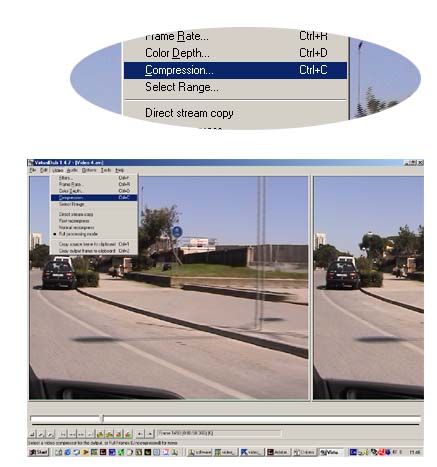
 

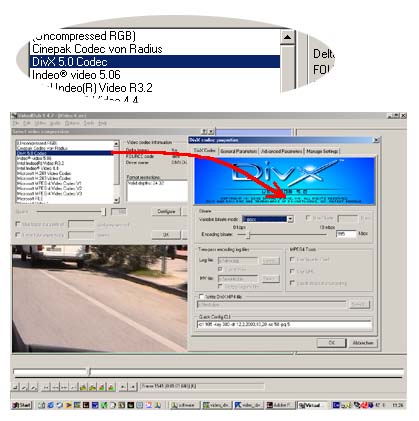
After opening the video with the Open Video File Button, choose the compression Codec DivX®. Click then onto the Configure Button on the right side.

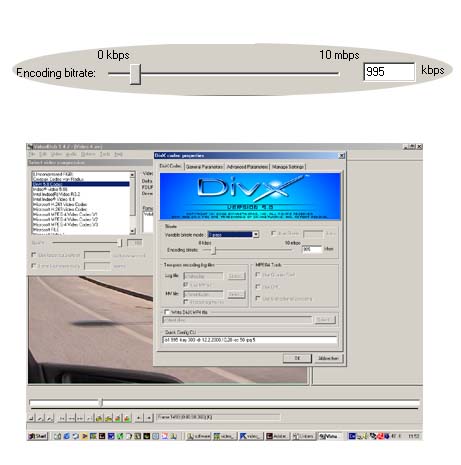
Now adjust the DivX® Codec. It offers a lot of adjustment possibilities to cover a large range of applications. For beginners, the easiest possibility is to choose "1 pass", to adjust the encoding bitrate between 700 and 1000 kbps and not to change all the other options. All adjustments have a great influence on the image quality and on the required disc space which makes it possible to find out the best individual adjustments and filter options by trying out.

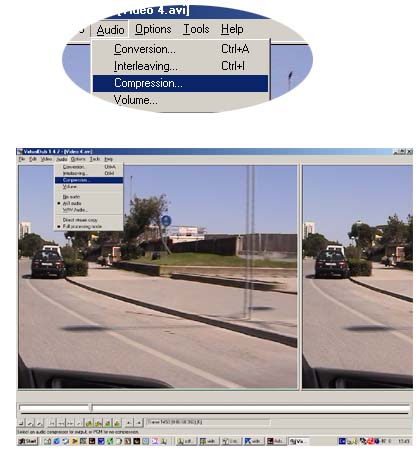
In equivalence to the video codec you can choose the audio codec at will. At the moment MP3 or the Lame Codec are the most efficient codecs.

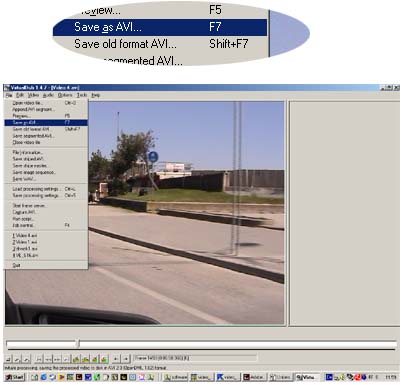
Rename your video sequence and press the "Save"-button.

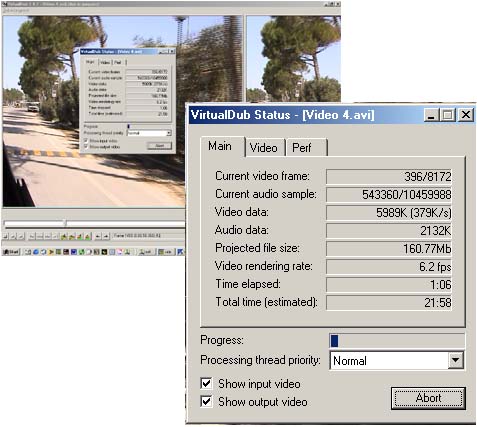
Now the computer starts encoding the video in DivX®. The status window of Virtual Dub shows all information concerning progress, projected file size (Mb), rendering rate (fps = frames per second) and the estimated total time.


Used computer: Notebook Gericom®: Webboy PIII 1000 , Win ME®


  Using DV camcorders and digital cameras in connection with the LM digital adapter in microscop

Related Links
Are HD single lens reflex cameras the better HD camcorders?
Analogue video output (AV) versus the digital HD output (HDMI) of digital cameras (digicams)
LMscope has developed an innovative LM filter adapter for using compact cameras in microscopy. Using the filter adapter makes it possible to connect almost every existing and future compact camera
Grammarus roeselii, video. Used instruments: LM Digital Adapter, Zeiss Standard microscope, Sony DV Camcorder DCR PC 120E, Notebook Gericom Webboy XL 1000
Archiving high definition (HD) videos in microscopy, using the DivX®6.4 video compression codec with Microsoft™ Windows Vista
Using the Canon XL H1 / XL H1A / XL H1S / XL2 with a microscope
VirtualDub 1.7 open source tool in microscopy to view and record
USB (universal serial bus) video cameras in microscopy – quite simply far too slow!
In microscopy, digital SLR cameras are the better video cameras!
HD Camcorder for use with a microscope for the bargain price of EUR 79.00
HD video macroscope with digital HD camcorder for a bargain price of EUR 79.00!
Full HD video macroscope for a bargain price with Aiptek AHD H5 Extreme digital full HD camcorder

New LM Digital Adapter for:Canon HR10 / Sony HDR-SR8 / Sony HDR-SR7 / Sony HDR-CX6 / Sony HDR-CX 11 / Sony HDR-SR 11 / Sony HDR-SR 1 / Sony HDR-HC7 / Sony HDR-SR5 / Sony HDR-HC5 / Sanyo XACTI VPC-HD1000 / Canon HF 100 / Canon HG 21 / Canon HG 20 / Canon HF 11 / Canon HF 10 / Sony HDR-HC 9 / Sony HDR-CX 6 / Sony HDR-HC3 / Sony HDR-SR1 / Sony HDR-HC1E / Sanyo XACTI VPC-HD1010 / Sony DCR-SR 210 / Canon HV 30 / Sony HDR-UX 19 / Sony HDR-SR 10 / Canon HG 10 / SonyHDR-UX 9 / Sony HDR-UX7 / Sony HDR-UX3 / Sony DCR-DVD 510 / Sony DCR-SR 75 / Sony DCR-HC 62 / Sony DCR-SR 55 / Sony HDR-FX 7 / Sony HDR-UX1 / Sony DCR-DVD 310 / Sony DCR-DVD 410 / Panasonic SDR-S 150 / Sony DCR-DVD 115 / Sony HDC-SD 100 /
 

High-end intermediate optics for connecting microscopes to:
  • digital compact cameras
  • digital SLR cameras
  • digital camcorders
  • video cameras
  • professional studio HDV camcorders
[Further information amd prices]
Which digital camera functions best on a microscope?
Turn your digital reflex camera into a microscope
  • LM DSLR macro lens 40mm / 80mm 
  • LM DSLR macro stand with round column
[Further information amd prices]
Special mounting media  for microscopy

Tips and tricks to connect your digital camera and to process digital images


© 1999-2010 MICRO TECH LAB. All rights reserved

How to order
Contact
Home
 Newsletter
Digitalcamera , Digital camera , Digital cameras , digital SLRs , digital SLR , Digital single lens reflex camera , Digital single lens reflex cameras , digicam , digicams , DSLR , D-SLR , D'SLR , Camcorder , HD Camcorder , HD Video , Videocamera , Webcam , USB-Camera , Compact digital cameras , USB2 , CMOS Cameras , CCD Cameras , Adapter , Husk , Optical Adaption , Connection Link , Coupler , Tube Connection , Eyepiece Tube , C-Mount , Photo Tube / Phototube , Tube Adapter , Trinocular Microscope , Videoport , Microcope Adaption , Custom-made , Adapter-Husk , C-Mount Connection , Photo Video Port , optical Adapter , C Mount , phototube and C-mount thread , Standard tubes of 23.2 mm internal diameter , Tubes of 30 mm internal diameter , Phototubes of 38 mm or 37 mm internal diameter (ISO port) , Nikon microscopes with VT phototube , Conversion kits for WILD M400 photomacroscope , Olympus Phototube with a 38 mm dovetail ring , Zeiss microscope tubes with 30 mm internal diameter (Interface 60) , Conversion kits for Olympus BH microscopes ,
Products Contact How to order Site Map