Top Microscopy articles 
HD Camcorder for use with a microscope for the bargain price of EUR 79.00
AIPTEK HD camcorder beats many professional video cameras
Nikon economises with the automatic exposure control! With the lower-priced Nikon D40/D40x /D50/D60/D90/D100 / D5000 
LM digital adapter connection now also available for compact cameras!
Which digital camera functions best on a microscope?
Compact cameras and camcorders on the microscope
DSLR cameras are simply better!
USB (universal serial bus) video cameras in microscopy – quite simply far too slow!
Setting the parfocality
Improved picture quality through mirror lock-up in SLR cameras
Using full-frame digital SLR cameras in microscopy
more articles
Top Macro photography articles 
HD video macroscope with digital HD camcorder for a bargain price of EUR 79.00! 
Full HD video macroscope for a bargain price with Aiptek AHD H5 Extreme digital full HD camcorder
Macro photography with the Olympus pancake 17 mm lens and the 80 mm LM DSLR macro lens
Digital macro photography with “classic analogue lenses” at bargain prices
Are normal stereo microscopes suitable for high-quality photographic documentation?
Turn your digital reflex camera into a microscope
LM DSLR Macro Lens Workshop
Compatibility list for LM DSLR macro lenses
more articles
Newsletter
Demo Pictures
Tips and tricks
Press Center
Reference Clients
Contact 


My video picture always has a stripy pattern in the background. What can I do about it?
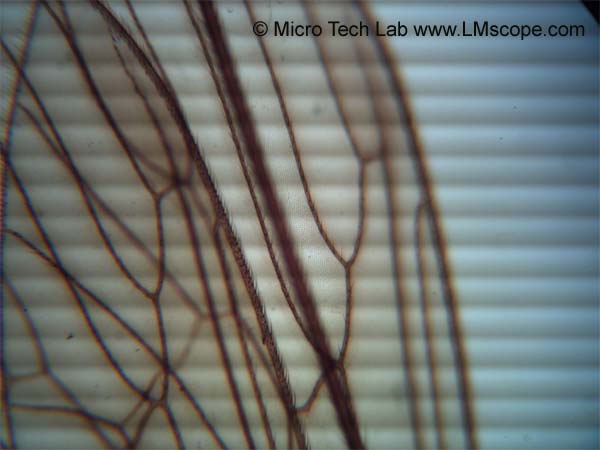


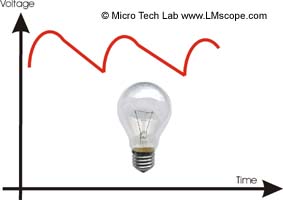
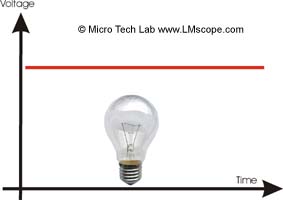
This effect is caused by an unstable or inadequately stabilised light source. The light “flickers” at a frequency of 50 or 100 Hz. These quick changes of light are not visible to the human eye, but they do interfere with video recordings. This results in disturbance, particularly when the number of images per second is low (under 30 images per second). Depending on the image frequency of the video camera there is also another stripe pattern. The automatic colour correction or the white balance of the video camera can further heighten this effect.


Possible solutions:

• Reduction in the intensity of the lighting (the stabilisation electronics work better with low power output)
• Activation of the “cancel flicker” mode (camera properties in the driver settings)
• Choice of a higher video camera recording frequency
• Deactivation of the automatic colour correction and the white balance
• Use of a microscope with a stabilised power supply
• Use of an externally stabilised source of light (e.g. light coupled in through a mirror)


Microscope lighting stabilised


 Microscope lighting not stabilised

Very well stabilised


Caution! This manual is protected by copyright. Unauthorised reproduction thereof, in whole or in part, is punishable by law. Only use with MICRO TECH LAB’s approval.

New LM Digital Adapter for:Canon EOS 5D Mark II / Nikon D3x / Canon EOS 7D / Canon EOS 550D / (Rebel T2i / Kiss X4 Digital) / Canon EOS 1D Mark IV / Canon EOS 500D / Digital Rebel T1i / Nikon D3S / Canon EOS 1Ds Mark III / Panasonic Lumix DMC-GH1 / Pentax K-7 / Nikon D300S / Nikon D700 / Nikon D3 / Panasonic Lumix DMC-G2 / Canon EOS 50D / Olympus E-30 / Nikon D300 / Olympus E-620 / Olympus E-3 / Olympus Pen E-P1 / Panasonic Lumix DMC-GF1 / Panasonic Lumix DMC-G10 / Olympus Pen E-P2 / Olympus Pen E-PL1 / Canon EOS 1D Mark III / Sony Alpha 450 / Olympus E-600 / Canon EOS 450D / Digital Rebel XSi / Olympus E-330 / Panasonic Lumix DMC-G1 / Nikon D5000 / Olympus E-520 / Olympus E-420 / Olympus E-450 / Canon EOS 1000D / Olympus E-510 / Olympus E-410 / Panasonic Lumix DMC-L10 / Pentax K20D / Sony Alpha 380 / Sony Alpha 550 /
 

High-end intermediate optics for connecting microscopes to:
  • digital compact cameras
  • digital SLR cameras
  • digital camcorders
  • video cameras
  • professional studio HDV camcorders
[Further information amd prices]
Which digital camera functions best on a microscope?
Turn your digital reflex camera into a microscope
  • LM DSLR macro lens 40mm / 80mm 
  • LM DSLR macro stand with round column
[Further information amd prices]
Special mounting media  for microscopy

Tips and tricks to connect your digital camera and to process digital images


© 1999-2010 MICRO TECH LAB. All rights reserved

How to order
Contact
Home
 Newsletter
Digitalcamera , Digital camera , Digital cameras , digital SLRs , digital SLR , Digital single lens reflex camera , Digital single lens reflex cameras , digicam , digicams , DSLR , D-SLR , D'SLR , Camcorder , HD Camcorder , HD Video , Videocamera , Webcam , USB-Camera , Compact digital cameras , USB2 , CMOS Cameras , CCD Cameras , Adapter , Husk , Optical Adaption , Connection Link , Coupler , Tube Connection , Eyepiece Tube , C-Mount , Photo Tube / Phototube , Tube Adapter , Trinocular Microscope , Videoport , Microcope Adaption , Custom-made , Adapter-Husk , C-Mount Connection , Photo Video Port , optical Adapter , C Mount , phototube and C-mount thread , Standard tubes of 23.2 mm internal diameter , Tubes of 30 mm internal diameter , Phototubes of 38 mm or 37 mm internal diameter (ISO port) , Nikon microscopes with VT phototube , Conversion kits for WILD M400 photomacroscope , Olympus Phototube with a 38 mm dovetail ring , Zeiss microscope tubes with 30 mm internal diameter (Interface 60) , Conversion kits for Olympus BH microscopes ,
Products Contact How to order Site Map