Top Microscopy articles 
HD Camcorder for use with a microscope for the bargain price of EUR 79.00
AIPTEK HD camcorder beats many professional video cameras
Nikon economises with the automatic exposure control! With the lower-priced Nikon D40/D40x /D50/D60/D90/D100 / D5000 
LM digital adapter connection now also available for compact cameras!
Which digital camera functions best on a microscope?
Compact cameras and camcorders on the microscope
DSLR cameras are simply better!
USB (universal serial bus) video cameras in microscopy – quite simply far too slow!
Setting the parfocality
Improved picture quality through mirror lock-up in SLR cameras
Using full-frame digital SLR cameras in microscopy
more articles
Top Macro photography articles 
HD video macroscope with digital HD camcorder for a bargain price of EUR 79.00! 
Full HD video macroscope for a bargain price with Aiptek AHD H5 Extreme digital full HD camcorder
Macro photography with the Olympus pancake 17 mm lens and the 80 mm LM DSLR macro lens
Digital macro photography with “classic analogue lenses” at bargain prices
Are normal stereo microscopes suitable for high-quality photographic documentation?
Turn your digital reflex camera into a microscope
LM DSLR Macro Lens Workshop
Compatibility list for LM DSLR macro lenses
more articles
Newsletter
Demo Pictures
Tips and tricks
Press Center
Reference Clients
Contact 


The Interlaced Method


Using DV camcorders and digital cameras with LM digital adapters in microscopy
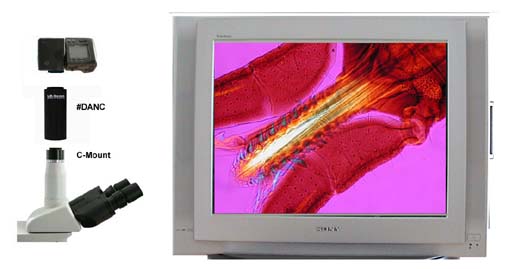
Television and video monitors are supplied with a PAL signal, which consists of 625 lines, of which only 576 contain usable image data. At least 16 images per second are needed to ensure that the appearance of motion is smooth. In television technology, 25 images are transmitted. Because of the simpler technical realization it was decided previously to only display half the image on the screen. This means that the human eye is presented with a half frame 50 times per second. The luminescence of the pixels merges the respective halves into one complete image.
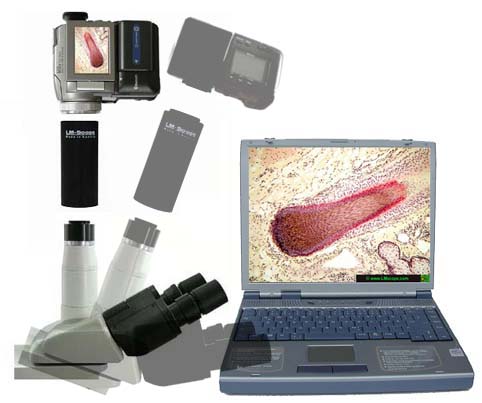
Computer monitors do not work with the interlaced technology, but always display the whole image. For example, 1024 x 788 resolution with 60 Hz: the screen displays the entire image 60 times per second, and no half frames.
To satisfy customers’ demands, modern camcorders must be able to prepare the image data for television monitors (PAL half images) and send video data via a digital output FireWire IE 1934. Depending on the method of recording on the magnetic tape, camcorders can be better or worse suited for various output types. With many camcorder models it is possible to save 50 full frames on the tape. This mode would be ideal for processing images on a computer and for presentation on the computer screen. If this mode is not available, then there are two possibilities to reduce interference effects:
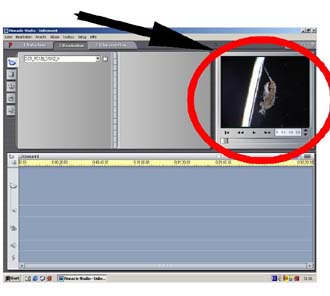
1. Delete a half frame as, for example, in the preview pf the Pinnacle Studio7 editing program
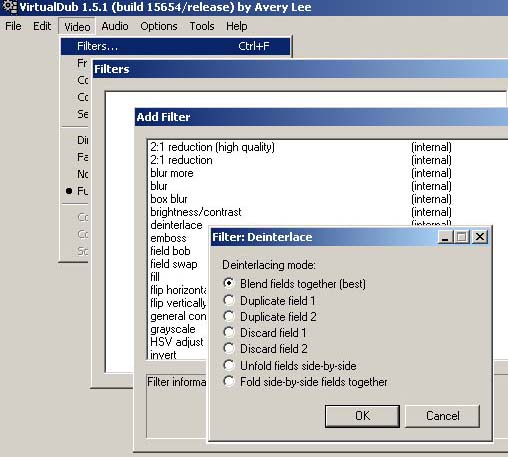
2. Use a deinterlacing filter. Here, the half frame artefacts are reduced to a minimum by means of a software algorithm.
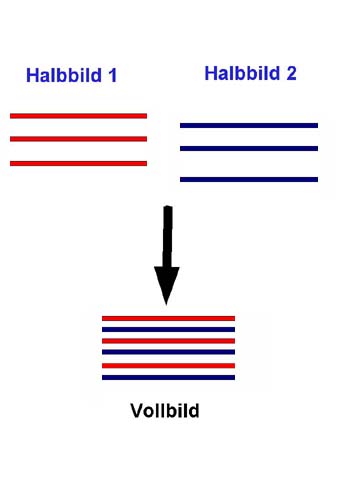
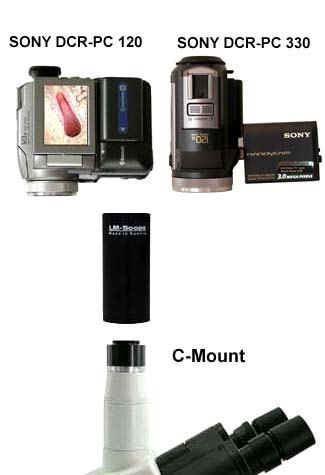
DV camcorders, such as the Sony PC 120, transfer video data via the FireWire interface with 25 full images with a 720 x 576 resolution and at 3.6 MB per second. If you view the saved AVI file in full resolution, then you will be disappointed by the poor quality of the picture. This is because the camcorder converts the original 50 half frames per second into 25 full frames per second. In this case, the full frame consists of two half frames, which are added together. The faster an image is changed, the lower the quality.
Modern processing programs avoid these effects in the preview by only ever displaying one half frame. If the film is only processed on a computer and is then rewritten onto the tape, it is not usually necessary to consider deinterlacing. When displaying the DV tape, 50 half frames are sent to the monitor, and no residual artefacts occur.

If you save the project in full quality on a computer (hard drive, CD) and also want to display it on the computer monitor, then the video must be processed using a deinterlacing filter.


Related Links
Live video streaming and video capture with a mobile computer (notebook)
Using DV camcorders and digital cameras in connection with LM Digital Adapters for microscopy
IEEE1394 (FireWire®)-ILINK® card: Digital transfer of video sequences from the DV camcorder to a computer
Connecting a digital camera to a computer via video output
Live video observation with digital camera and TV monitor
Without using a computer it is possible to watch the the objects in the microscope realtime on a TV monitor. This method enables focusing the object correctly as well as watching and discussing in a group.

New LM Digital Adapter for:Canon HR10 / Sony HDR-SR8 / Sony HDR-SR7 / Sony HDR-CX6 / Sony HDR-CX 11 / Sony HDR-SR 11 / Sony HDR-SR 1 / Sony HDR-HC7 / Sony HDR-SR5 / Sony HDR-HC5 / Sanyo XACTI VPC-HD1000 / Canon HF 100 / Canon HG 21 / Canon HG 20 / Canon HF 11 / Canon HF 10 / Sony HDR-HC 9 / Sony HDR-CX 6 / Sony HDR-HC3 / Sony HDR-SR1 / Sony HDR-HC1E / Sanyo XACTI VPC-HD1010 / Sony DCR-SR 210 / Canon HV 30 / Sony HDR-UX 19 / Sony HDR-SR 10 / Canon HG 10 / SonyHDR-UX 9 / Sony HDR-UX7 / Sony HDR-UX3 / Sony DCR-DVD 510 / Sony DCR-SR 75 / Sony DCR-HC 62 / Sony DCR-SR 55 / Sony HDR-FX 7 / Sony HDR-UX1 / Sony DCR-DVD 310 / Sony DCR-DVD 410 / Panasonic SDR-S 150 / Sony DCR-DVD 115 / Sony HDC-SD 100 /
 

High-end intermediate optics for connecting microscopes to:
  • digital compact cameras
  • digital SLR cameras
  • digital camcorders
  • video cameras
  • professional studio HDV camcorders
[Further information amd prices]
Which digital camera functions best on a microscope?
Turn your digital reflex camera into a microscope
  • LM DSLR macro lens 40mm / 80mm 
  • LM DSLR macro stand with round column
[Further information amd prices]
Special mounting media  for microscopy

Tips and tricks to connect your digital camera and to process digital images


© 1999-2010 MICRO TECH LAB. All rights reserved

How to order
Contact
Home
 Newsletter
Digitalcamera , Digital camera , Digital cameras , digital SLRs , digital SLR , Digital single lens reflex camera , Digital single lens reflex cameras , digicam , digicams , DSLR , D-SLR , D'SLR , Camcorder , HD Camcorder , HD Video , Videocamera , Webcam , USB-Camera , Compact digital cameras , USB2 , CMOS Cameras , CCD Cameras , Adapter , Husk , Optical Adaption , Connection Link , Coupler , Tube Connection , Eyepiece Tube , C-Mount , Photo Tube / Phototube , Tube Adapter , Trinocular Microscope , Videoport , Microcope Adaption , Custom-made , Adapter-Husk , C-Mount Connection , Photo Video Port , optical Adapter , C Mount , phototube and C-mount thread , Standard tubes of 23.2 mm internal diameter , Tubes of 30 mm internal diameter , Phototubes of 38 mm or 37 mm internal diameter (ISO port) , Nikon microscopes with VT phototube , Conversion kits for WILD M400 photomacroscope , Olympus Phototube with a 38 mm dovetail ring , Zeiss microscope tubes with 30 mm internal diameter (Interface 60) , Conversion kits for Olympus BH microscopes ,
Products Contact How to order Site Map